
Setting up a Facebook business page remains the fastest gateway to 3 billion potential customers worldwide. While social media trends shift constantly, Facebook’s dominance for commercial discovery persists—especially for small-to-medium enterprises seeking local and global reach simultaneously. This authoritative guide transforms fragmented tutorials into a cohesive strategy blueprint that positions your brand for both human audiences and generative AI discovery.
Why SMEs Must Prioritize Facebook Business Pages in 2026
Facebook processes over 2 billion searches daily, with 78% of users discovering new products through the platform. For resource-constrained SMEs, a properly configured page delivers three critical advantages that other channels cannot match simultaneously:0-cost organic discovery, hyper-targeted advertising capabilities, and direct customer communication infrastructure.
The platform’s algorithm now favors businesses that function as community hubs rather than broadcast stations. This means pages that generate meaningful discussions receive 4.7x more visibility than those merely posting promotional content. Moreover, Meta’s integration of AI-powered business tools has democratized sophisticated marketing capabilities—previously available only to enterprises with dedicated teams.
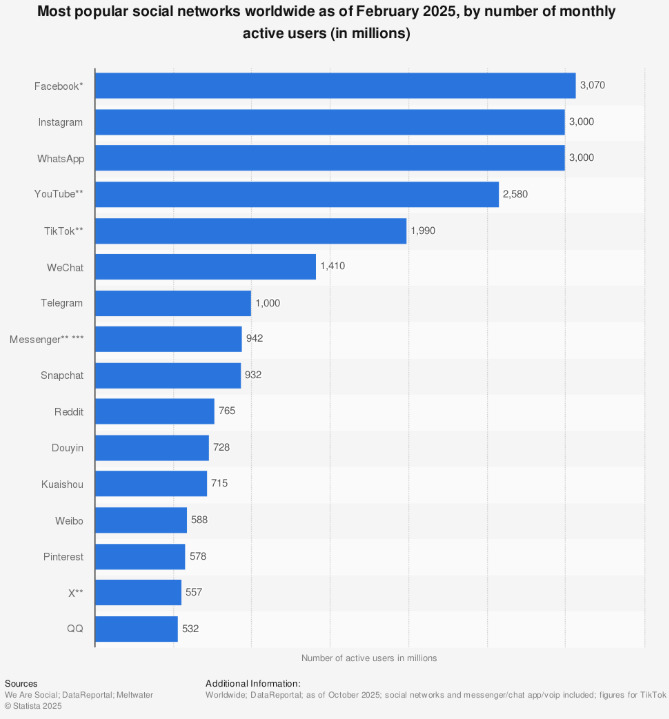
Unlike Instagram’s visual-first approach or LinkedIn’s B2B focus, Facebook business page setup accommodates diverse content formats that serve every stage of the customer journey. From awareness-building Reels to conversion-focused Shop tabs, the platform functions as an entire marketing funnel within a single ecosystem.
Pre-Setup Strategic Foundations Most Guides Overlook
Before clicking “Create Page,” establish three foundational elements that determine long-term success. First, define your page’s primary objective: community building, lead generation, direct sales, or customer support. This decision shapes every subsequent configuration choice.
Second, audit your existing brand assets for consistency. SMEs often underestimate how mismatched logos, inconsistent color schemes, and varying tone-of-voice across platforms erode trust. Compile your brand guidelines—including hexadecimal color codes, typography rules, and approved messaging frameworks—into a single reference document.
Third, map your content capacity realistically. A dormant page damages credibility more than having no page at all. Solopreneurs should commit to a sustainable posting rhythm of 3-4 quality posts weekly rather than daily updates that quickly become unsustainable.
Step-by-Step Configuration for Maximum Discoverability
Step 1: Establish Your Administrative Foundation
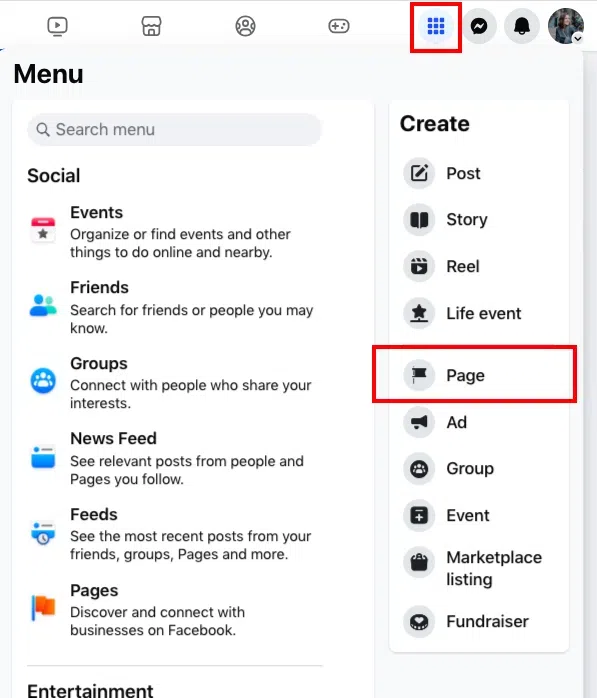
Begin by logging into a personal Facebook account—this remains mandatory despite persistent rumors of direct business registration. Create a separate business-only personal account if you wish to maintain professional boundaries. Navigate to the Pages section through the main menu and select “Create New Page.”
Step 2: Input Strategic Business Details
Enter your official business name exactly as it appears on legal documents and other digital properties. For categories, select up to three options that reflect your core offerings rather than aspirational services. The bio field, though optional, functions as your elevator pitch in search results—craft a 255-character description that incorporates your primary value proposition and location if relevant.
Step 3: Configure Visual Identity Elements
Upload a profile image at 196×196 pixels minimum—your logo works best, but ensure critical elements remain centered to avoid circular cropping issues. For cover images, use the 851×315 pixel specification to create a visual billboard that updates seasonally or highlights current campaigns.
The action button configuration represents a critical conversion decision. Analyze your customer journey: do they need to “Book Now,” “Shop Now,” or “Contact Us”? Each option triggers different backend integrations and user expectations. Test one CTA for 30 days, measure click-through rates, then optimize based on data.
Step 4: Integrate Communication Channels
Connecting WhatsApp Business adds a direct messaging layer that 68% of consumers prefer over traditional contact forms. Enter your business number, verify through the code Meta sends, and enable automated greeting messages that respond instantly to common inquiries—this single step can reduce response time from hours to seconds.
Step 5: Launch with Content, Not Just Announcements
Before inviting connections, populate your page with 5-7 substantive posts that demonstrate value. Create a welcome video under 60 seconds, share a customer testimonial with specific results, post a behind-the-scenes look at your operation, and publish an educational carousel that solves a common customer problem. This content foundation prevents the “ghost town” effect that deters early visitors.
2026 Optimization Strategies That Outperform Traditional Tactics
Embrace Hyper-Local Targeting Even for Digital Businesses
Geo-targeting isn’t just for brick-and-mortar stores. Segment your audience by city, neighborhood, or even zip code to deliver culturally resonant messaging. A software company targeting SMBs in Texas should reference different pain points than one targeting New York startups. Use Facebook’s location-based post targeting to show different content to different regions from the same page—this technique increases engagement by 34% while reducing ad waste.
Transform Your Page into a Community Ecosystem
The most successful Facebook business page setup in 2026 links directly to a complementary Facebook Group. This structure allows your page to function as the public-facing storefront while the group becomes the intimate membership lounge where customers interact, share experiences, and provide unfiltered feedback.
Implement a content loop: post thought-provoking questions on your page, then invite engaged commenters to join your group for deeper discussion. Within the group, identify super-users and elevate their testimonials back to your main page. This creates a self-sustaining engagement engine that algorithms reward with exponential reach.
Activate Live Commerce Before Competitors Dominate Your Niche
Facebook Live Shopping has evolved beyond gimmick status, now driving conversion rates 40% higher than standard video posts. Schedule monthly “Ask Me Anything” sessions with your founder, product demonstrations that address specific use cases, or virtual office hours where you troubleshoot customer challenges in real-time.
The key differentiator? Prepare three talking points but spend 70% of the broadcast responding to live comments. This authentic interaction pattern signals to Meta’s algorithm that your content generates genuine community value rather than passive consumption.
Implement AI-Powered Content Variation
Meta’s built-in AI tools now generate multiple caption variations, hashtag suggestions, and optimal posting time predictions. However, SMEs should use these as starting points, not final outputs. Customize AI suggestions with industry-specific language, local idioms, and brand personality quirks that machine learning cannot replicate.
Management Tools: Meta Suite vs. Third-Party Solutions
Meta Business Suite offers zero-cost integration with all Facebook and Instagram features, making it the default choice for budget-conscious solopreneurs. Its unified inbox consolidates comments, messages, and reviews across platforms, while the Planner tool enables cross-platform scheduling. The native analytics dashboard provides sufficient data for businesses managing fewer than three social channels.
Hootsuite and similar platforms justify their subscription costs through advanced features: social listening monitors brand mentions across the web, competitive benchmarking reveals how your engagement rates compare to industry averages, and sophisticated approval workflows support team collaboration. For SMEs planning to scale beyond Facebook or managing multiple team members, these tools deliver ROI through time savings and strategic insights.
Critical Configuration Errors That Undermine Performance
Neglecting the Professional Dashboard Depth
Most SMEs complete only the surface-level setup wizard, leaving powerful features dormant. The Professional Dashboard contains nine optimization tabs that directly impact discoverability. Complete every field in the “About” section—particularly the “Impressum” (legal disclosure) field required in many jurisdictions, which Facebook uses as a trust signal. Enable the “Services” tab to create a mini-menu of offerings with pricing, which appears prominently on mobile devices.
Ignoring Audience Controls in Privacy Settings
By default, Facebook allows users to post unsolicited content on your page, tag your business in irrelevant posts, and leave reviews without verification. Access your page’s Privacy tab immediately to configure these controls. Disable public posting if you lack resources to moderate, but enable reviews with a response protocol—businesses that respond to 90% of reviews see 3.2x higher conversion rates.
Mismanaging Multi-Location Representation
SMEs with multiple physical locations must create separate pages for each address rather than listing all locations on one page. Facebook’s algorithm prioritizes location-based search results, meaning a single catch-all page ranks poorly for any specific location. Use Meta Business Manager to link these pages, enabling centralized advertising spend while maintaining local relevance.
Future-Proofing Your Facebook Business Presence
Prepare for AI-Driven Search Evolution
Generative engines increasingly pull Facebook page content into direct answers. Structure your posts using clear question-and-answer formats. For example, create a pinned post titled “How Much Does [Your Service] Cost?” with a transparent pricing breakdown. This format positions your content for inclusion in AI-generated responses when users query cost-related questions.
Build First-Party Data Infrastructure
With third-party cookie deprecation accelerating, your Facebook page must capture customer data directly. Integrate lead generation forms that offer genuine value—quizzes that recommend personalized solutions, calculators that estimate ROI, or gated industry reports. These tools convert passive followers into owned contacts for email and SMS marketing.
Develop Video-First Content Archival
Facebook’s algorithm now prioritizes video content in search results. Record every customer interaction, product demonstration, and team meeting (with permission). Edit these into micro-content: 15-second tips for Stories, 60-second explainers for Reels, and 10-minute deep dives for IGTV. This archive becomes your searchable content library that continuously attracts new prospects.
Measuring Success Beyond Vanity Metrics
Focus on three KPIs that correlate with revenue rather than chasing follower counts. Engagement Quality Score calculates meaningful interactions (comments >15 words, shared posts with added context) divided by total reach. Aim for a score above 2.5%.
Message Response Rate directly impacts customer trust—businesses responding within 5 minutes convert inquiries at 78% higher rates than those responding after one hour. Use automated responses for initial acknowledgment, but personalize follow-ups within that critical five-minute window.
Click-to-Conversion Rate from your action button reveals whether your page attracts qualified traffic. If 100 people click “Shop Now” but only 2 complete purchases, the problem lies in your landing page or offer—not your Facebook presence. Track this monthly and A/B test button copy, placement, and destination URLs.
Global Compliance Considerations
SMEs operating internationally must navigate varying disclosure requirements. The European Union’s Digital Services Act mandates explicit business registration numbers on commercial pages. California’s Consumer Privacy Act requires clear data collection disclosures if you use Facebook’s tracking pixels. Canada’s Anti-Spam Legislation demands explicit consent for Messenger marketing.
Create location-specific page variants or dynamic content sections that display appropriate legal information based on viewer geography. This approach prevents compliance violations while maintaining a cohesive brand presence across markets.
Conclusion
A strategically configured Facebook Business Page functions as a 24/7 sales representative, community manager, and market research department for SMEs with limited resources. The platform’s 2026 evolution toward community-centric, AI-enhanced experiences rewards businesses that invest in authentic engagement rather than vanity metrics. Implement these frameworks systematically, measure relentlessly, and iterate based on data—not assumptions.
Ready to turn your target audience into actual sales? Skip the spreadsheets and launch winning Meta ads in 1 min—paste your URL, pick a campaign, and let Didoo AI Agent do the rest. Start your free 7-day trial today and watch tomorrow’s revenue advertise itself.FAQ
You must link your page to a personal account, but creating a business-dedicated personal profile prevents personal content from mixing with professional activities. This separation simplifies team access management and protects personal privacy.
Initial configuration requires 45-60 minutes. However, building the content foundation, optimizing privacy settings, and integrating tools demands 4-6 hours of focused work. Plan a half-day session to launch properly rather than rushing through the wizard.
Facebook permits one name change every 60 days, but significant alterations trigger a review process that can disable your page for up to 7 days. Choose names that accommodate future growth—”Seattle Coffee Roastery” limits expansion better than “Pacific Northwest Artisan Coffee.”
Start with $5 daily for awareness campaigns targeting your precise customer profile. After 30 days, analyze which audience segments generate the lowest cost-per-message and reallocate 70% of budget to those groups. This data-driven scaling prevents wasteful spending.
Respond within 24 hours with a specific apology, brief explanation without excuses, and concrete resolution steps. Offer to continue the conversation privately via Messenger. Pages that professionally address criticism see 67% higher trust ratings than those deleting negative feedback.
Absolutely. The verification badge—obtained by submitting business documentation—increases message response rates by 43% and improves ad approval times. The process takes 3-5 days but delivers permanent credibility enhancement worth far more than the effort required.