Can you edit a post in Instagram after hitting that publish button? This question plagues small business owners and solo entrepreneurs daily. Whether you’ve spotted a typo in your product description, tagged the wrong location, or forgotten to include a key image, understanding Instagram’s editing capabilities saves you from costly mistakes that could hurt your brand reputation.
Social media serves as the digital storefront for millions of small businesses worldwide. A single post can attract customers, build trust, or drive sales. Yet the pressure to publish quickly often leads to errors that need immediate correction. This comprehensive guide reveals exactly what you can modify after publishing, what remains locked, and how to avoid the most common pitfalls that plague SME owners managing their own social media presence.
What You Can Actually Edit on Instagram After Posting
Instagram provides several post-publication editing options, though these features come with significant limitations. Understanding these boundaries helps you plan content strategically rather than scrambling for workarounds later.
- Caption modifications represent the most frequently used editing feature. You can fix typos, update product descriptions, add hashtags, or refine your call-to-action at any time after publishing. Simply tap the three-dot menu on your post, select “Edit,” and modify your text. Instagram won’t notify your followers of these changes, making this ideal for subtle corrections that maintain your professional image.
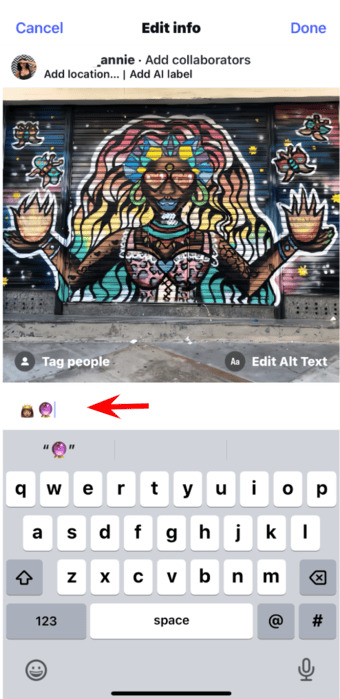
- Tag management offers flexibility for businesses collaborating with partners or featuring customers. You can add, remove, or adjust people tags and location tags even after publication. This proves particularly valuable when you realize you’ve tagged the wrong account or need to add a collaborator who contributed to the content.
- Accessibility features like alt text remain editable post-publication. Adding descriptive alt text helps visually impaired users understand your content while improving your SEO performance. Many small business owners overlook this feature initially, then add it later when optimizing their accounts.
- AI labels and collaborator settings can also be adjusted after posting, ensuring proper attribution as partnerships evolve or content guidelines change.
However, several critical elements remain locked once you publish. You cannot change the actual photos or videos, rearrange carousel order, modify aspect ratios, add music, or convert single images into multi-photo posts. These limitations frustrate many SME owners who discover missing content only after publishing.
Can You Add a Photo to an Instagram Post After Publishing?
The short answer is no. Instagram does not allow users to add additional photos to existing posts once published. This restriction applies to all post types—single images, carousels, and video content. The platform treats published media as permanent records to maintain engagement integrity and prevent manipulation of likes, comments, and shares.
This limitation creates significant challenges for businesses running time-sensitive campaigns or managing user-generated content. Imagine launching a product showcase and realizing you’ve excluded your bestseller, or sharing customer testimonials while accidentally omitting your most compelling review. Without the ability to add photos retroactively, these oversights require alternative solutions.
Your best alternatives include:
- Carousel planning prevents this issue entirely. Instagram permits up to 10 photos or videos in a single carousel post. Taking time to review all selected media before publishing eliminates the need for later additions. Draft your carousel, step away for ten minutes, then review with fresh eyes before sharing.
- Sequential storytelling turns limitations into opportunities. Rather than adding to existing posts, create follow-up content that references previous posts. Use captions like “Swipe for part two” or “Continuing yesterday’s story” to maintain narrative flow while driving engagement across multiple posts.
- Instagram Stories and Highlights provide flexible alternatives for supplementary content. Stories disappear after 24 hours unless saved to Highlights, making them perfect for temporary updates or additional angles. Mention your original post in Stories to drive traffic back to your permanent feed content.
- Reels and IGTV offer extended storytelling formats when static posts feel limiting. These features support longer narratives and multiple clips, reducing the pressure to fit everything into a single feed post.
How to Edit Photos on Instagram After Posting: Workarounds That Work
While Instagram prevents direct photo editing after publication, several strategies help you correct visual mistakes without losing existing engagement.
- The delete-and-repost method works when errors prove catastrophic. If you’ve posted the wrong image, used an unflattering filter, or shared low-quality visuals, deleting and republishing may become necessary. However, this approach sacrifices all likes, comments, and shares accumulated on the original post. For small accounts building momentum, this loss can significantly impact algorithmic visibility.
- Strategic timing minimizes damage when deletion becomes unavoidable. If you must delete and repost, act quickly—ideally within the first hour when engagement remains low. The longer a post accumulates interactions, the more valuable those social signals become.
- Draft utilization prevents most editing headaches. Instagram’s draft feature allows you to save unfinished posts, review them later, and publish only when completely satisfied. This proves especially valuable for businesses managing multiple products or services, where details matter enormously.
- Third-party preview tools like Later, Planoly, or Preview enable visual planning before publishing. These apps show how posts will appear in your grid, helping you spot missing images, poor cropping, or aesthetic inconsistencies. Many offer scheduling capabilities that create natural review periods before automatic publication.
- Batch content creation reduces pressure-induced errors. Rather than creating posts individually under time constraints, dedicate specific days to content production. This approach yields higher quality visuals and reduces the likelihood of mistakes requiring post-publication fixes.
Common Instagram Editing Mistakes SMEs Must Avoid
Small business owners juggle countless responsibilities, making social media errors inevitable. However, certain mistakes damage credibility more than others. Recognizing these pitfalls helps you maintain professional standards while avoiding algorithmic penalties.
- Over-editing captions creates confusion and distrust. While fixing typos poses no problem, completely rewriting captions after receiving engagement appears disingenuous. Followers who commented on your original message may find their responses disconnected from your new text, creating awkward public conversations.
- Excessive post modifications signal disorganization. Constantly editing posts makes your account appear unprofessional and may trigger Instagram’s spam detection systems. Major brands rarely edit posts repeatedly; neither should your business.
- Hashtag stuffing after publication looks desperate for reach. Adding 30 hashtags to a post hours after publication rarely improves performance and often appears spammy to followers reviewing your content later. Plan hashtags during creation, not as an afterthought.
- Neglecting alt text excludes visually impaired customers and misses SEO opportunities. Many businesses add this accessibility feature only after learning about it, but retrofitting hundreds of old posts rarely happens. Build alt text into your creation workflow from the start.
- Forgetting location tags limits local discovery. Small businesses serving specific geographic areas lose potential customers when they omit location data. While you can add this later, immediate inclusion ensures maximum reach during the critical first hours when algorithmic momentum builds.
- Ignoring the “Instagram your edits weren’t saved” error leads to wasted effort. This frustrating message appears when connectivity issues interrupt the saving process. Always verify your edits actually saved by refreshing your profile before assuming changes took effect.
Best Practices for Instagram Post Management
Effective Instagram management requires systems that prevent errors rather than fixing them later. Implement these practices to minimize post-publication editing needs.
- The 24-hour rule suggests waiting a full day before publishing important content. Create your post, save it as a draft, then review the next day with fresh perspective. This simple delay catches most errors that currently require editing.
- Checklist utilization ensures consistency across all posts. Your checklist might include: caption proofreading, hashtag relevance, proper tagging, location accuracy, alt text completion, and visual quality verification. Physical checklists prevent mental oversights during busy periods.
- Team review processes catch errors individual creators miss. Even solopreneurs benefit from asking friends, family, or virtual assistants to review important posts before publication. A second pair of eyes spots typos, wrong tags, or missing images you overlooked.
- Content calendar integration reduces rushed posting. When you plan content weeks ahead, you eliminate the time pressure that causes most errors. Scheduled posts allow review periods and team approvals without sacrificing publication consistency.
- Analytics monitoring reveals whether your editing practices hurt performance. Track engagement rates on edited versus unedited posts. If you notice decreased reach after caption modifications, adjust your editing frequency accordingly.
- Backup content maintenance provides alternatives when major errors occur. Keep a library of evergreen posts ready for immediate publication. When you must delete a flawed post, replace it quickly rather than leaving gaps in your content schedule.
Conclusion
Mastering Instagram’s editing capabilities empowers small business owners to maintain polished, professional social media presence without expensive agency support. While platform limitations frustrate users seeking perfect flexibility, understanding these boundaries helps you work within constraints rather than against them. Plan thoroughly, utilize drafts, and edit strategically to build an Instagram presence that drives real business results.
Ready to turn your target audience into actual sales? Skip the spreadsheets and launch winning Meta ads in 1 min—paste your URL, pick a campaign, and let Didoo AI Agent do the rest. Start your free 7-day trial today and watch tomorrow’s revenue advertise itself.FAQ: Instagram Post Editing for Business Owners
No. Instagram does not permit changes to actual images or videos after publication. You cannot apply new filters, adjust cropping, or replace photos. For visual changes, you must delete the entire post and create a new one.
Delete the incorrect post, then upload the correct image as a new post. Unfortunately, you will lose all engagement from the original post. To minimize impact, delete quickly before the post accumulates significant likes and comments.
No. Filter adjustments must occur before publishing. If you’re unhappy with applied filters after posting, deletion and republication remain your only options.
Instagram now allows individual photo removal from carousels. Navigate to the post, tap the three-dot menu, select “Edit,” swipe to the unwanted image, and tap the trash icon. Note that carousels must maintain at least two images—you cannot convert a carousel to a single image through deletion.
Minor caption edits rarely affect reach significantly. However, frequent modifications or major caption rewrites may signal content instability to Instagram’s algorithm. Edit thoughtfully and sparingly.
No. Photo order becomes permanent upon publication. You can only rearrange images during the creation process before hitting publish. Plan your visual narrative carefully during drafting.
This error typically indicates connectivity problems. Ensure stable internet connection, force-close and reopen the Instagram app, then attempt your edit again. If problems persist, try editing from a different device or wait until server issues resolve.
Unfortunately, no method exists for adding photos to published posts. Your alternatives include creating a follow-up post, sharing additional content via Stories, or deleting and republishing as a carousel with all intended images.
Absolutely. Drafts represent your best defense against posting errors. Save posts as drafts, review them later with fresh eyes, and publish only when completely confident in their accuracy and quality.
Edit as soon as possible, ideally within the first hour of posting when engagement remains minimal. Quick corrections prevent followers from seeing errors while preserving your professional image.