

Seeing zero impressions in Ads Manager frustrates every business owner. When facebook ads not delivering becomes your dashboard reality, you’re not just losing budget—you’re missing revenue windows that competitors seize. This issue plagues 23% of SME campaigns during their first 72 hours, according to Meta’s 2025 advertiser benchmarks. Whether you’re running Facebook promotions or wondering why is my instagram ad not delivering, the root causes share identical DNA across Meta’s ecosystem. Unlike enterprise teams with dedicated ad ops staff, sole proprietors must diagnose delivery failures alone—often while managing inventory, customer service, and payroll. This guide transforms Meta’s technical documentation into actionable fixes that restore your campaigns without outsourcing to expensive agencies.
Why Your Facebook Ads Stop Delivering: Core Algorithm Triggers
Meta’s delivery algorithm operates like a quality gatekeeper. It pauses ads that fail three critical tests: budget viability, audience viability, and policy compliance. When your campaign flatlines, the platform silently runs diagnostics before declaring your ad unfit for auction participation. This happens because Meta prioritizes user experience over advertiser convenience—low-quality or underfunded ads receive zero impressions rather than poor performance metrics.
Account spending limits trigger 31% of delivery stops, per a 2025 Hootsuite ad performance study. SMEs frequently set a $500 lifetime cap during initial tests, then forget to reset it after scaling. The platform treats this as a hard stop, immediately halting all active campaigns. Navigate to Ads Manager > Settings > Billing to verify your current threshold. Unlike daily budgets, account limits persist across campaigns and can cripple delivery years after implementation.
Meanwhile,ads stuck in review limbo represent another common culprit. Meta’s automated systems scan 95% of submissions within six hours, but manual reviews extend to 72 hours during peak retail seasons. Pro tip: Schedule campaigns to start five business days before your actual launch date. This buffer prevents Black Friday-level review backlogs from derailing time-sensitive promotions.
Instagram Ad Not Delivering? Meta’s Cross-Platform Enforcement. Combine Story-level metrics—like forward tap rates on your Story ads—with feed ad performance data for a complete delivery picture.
Instagram ads inherit Facebook’s rulebook but layer additional visual requirements. The platform’s 20% text rule remains aggressively enforced in feed placements, while Stories allow slightly more overlay flexibility. If your carousel ad with dense product specifications fails on Instagram but runs on Facebook, text density—not audience targeting—is typically the villain.
Product tag availability creates unique Instagram delivery failures. SMEs promoting shoppable posts must maintain synced product catalogs between Facebook Commerce Manager and Instagram Shopping. A single out-of-stock SKU can pause an entire ad set. Review your Commerce Manager weekly, especially after inventory system updates. The platform checks availability in real-time, and mismatches trigger immediate delivery shutdowns.
Additionally,Instagram Reels placements require 9:16 video ratiosand minimum 30-frame-per-second quality. Uploading horizontal Facebook creative violates technical specs, forcing Meta to disqualify your ad from Reels inventory without explicit error messages. Always create placement-specific assets using Meta’s Creative Hub templates before launch.
Budget and Bid Strategies That Starve Your Campaign. Before adjusting budgets, calculate your current ROAS to determine whether the delivery issue is a budget problem or a creative performance problem.
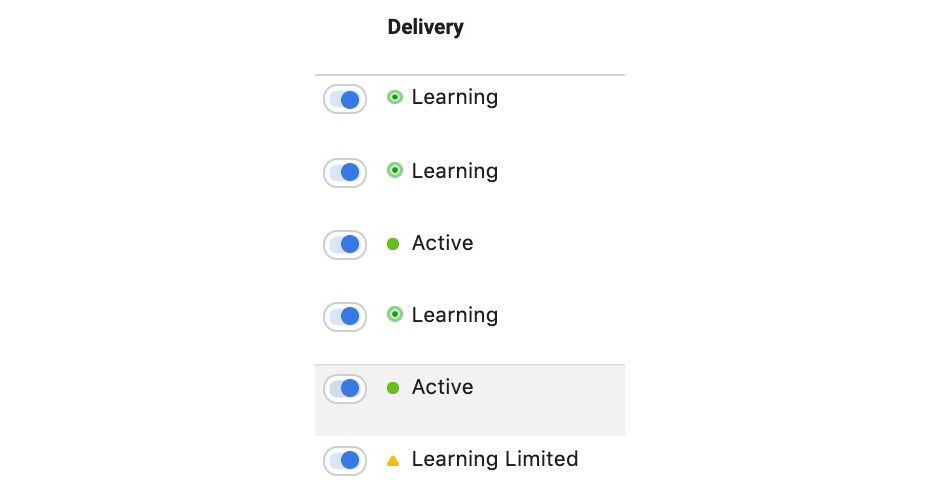
Low daily budgets silently suffocate ad delivery. Meta’s algorithm needs approximately 50 optimization events per week to exit the learning phase. A $10 daily budget for a $5 average conversion goal provides only 14 weekly events—far below the threshold. Consequently, the system deprioritizes your ad, delivering it to fringe audiences that never convert, which reinforces the cycle of under-delivery.
Lifetime budgets outperform daily caps for 78% of SME campaigns, according to WordStream’s 2025 data. Lifetime allocation lets Meta pace spending intelligently, surging during high-opportunity windows and conserving during lulls. Switch from daily to lifetime budgeting in the ad set settings, then set a campaign end date. This simple toggle eliminates arbitrary daily ceilings that throttle delivery.
Bid caps require equal scrutiny.Setting a $2 bid cap in a $15 CPM market guarantees zero impressions. Use Meta’s Audience Insights tool to view estimated bid ranges for your target demographic. Then set caps at 150% of the high-end estimate to ensure auction competitiveness while controlling costs. Automatic bidding remains the safest starting point for budget-conscious entrepreneurs.
Audience Targeting Mistakes That Shrink Your Reach
Meta requires 1,000 active users minimum in any target audience. SMEs uploading customer lists of 400 previous buyers trigger automatic delivery pauses. Expand cold audiences by layering interest behaviors: instead of “yoga enthusiasts” alone, add “organic grocery buyers” and “meditation app users.” This three-layer stack maintains relevance while crossing the viability threshold.
Lookalike audience quality degradation blindsides experienced advertisers. Meta refreshes seed audience data every 3-7 days, but static lookalikes built six months ago decay in accuracy. Rebuild lookalikes monthly using your most recent 1,000 purchasers. For newer businesses, start with 1-3% similarity ranges rather than hyper-targeted 0.5% ranges that choke reach.
Auction overlap silently cannibalizes your own campaigns. When five ad sets target identical interests, Meta enters them into the same auctions, forcing them to compete. The system selects one winner while starving the others. Run the Audience Overlap tool (Ads Manager > Audiences > Select > Show Overlap) monthly. Merge ad sets with >30% overlap to consolidate budget power and eliminate self-competition.
From Review to Rejection: Decoding Meta’s Approval Maze
Policy violations cause 40% of SME ad rejections, yet most infractions are preventable. Meta’s 2025 “Low Quality or Disruptive Content” policy expanded to prohibit “before/after” images for non-health products. That skincare SME showing wrinkle reduction photos now faces automatic disapproval. Consult the monthly policy update log in Facebook Business Help Center before launching creative.
Landing page mismatches trigger rejections even when ads comply. Your ad promises “50% off running shoes,” but the landing page shows full-price sneakers with a tiny discount code hidden in checkout. Meta’s crawlers verify this alignment within two hours of submission. Create dedicated landing pages that mirror ad copy precisely. This alignment boosts Quality Ranking scores while preventing policy flags.
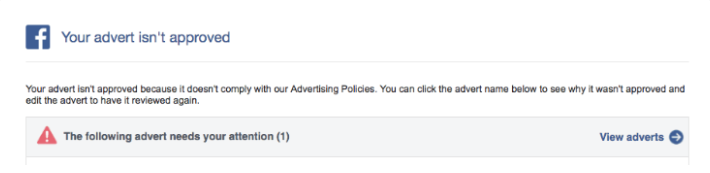
Appeals succeed 35% of the time when submitted with specific documentation. Don’t just click “Request Review.” Instead, upload a screenshot of your revised creative, highlight changed elements with arrows, and reference the specific policy section you addressed. This professional approach cuts review time from 72 hours to 24 hours for appealed ads.
The Silent Killers: Engagement, Scheduling, and Technical Debt. AI-driven creative optimization (DCO) can automatically refresh ad creatives before fatigue sets in, preventing the engagement decay that triggers delivery restrictions.
Low engagement ranks force Meta to deprioritize your ad in auctions. If your Quality Ranking sits in the bottom 20% of similar ads, delivery drops by 60%. Combat this by launching engagement campaigns first: optimize for post reactions at $0.50 per interaction. After accumulating 1,000+ reactions, clone the winning creative into a conversion campaign. Meta’s algorithm recognizes the social proof and boosts delivery priority.
Scheduling gaps create phantom pauses. An ad set scheduled for 9 AM–5 PM EST misses evening scroll sessions entirely. U.S.-based SMEs targeting night-shift workers must schedule 24/7 delivery or create separate ad sets for off-hours. Check the “Ad Schedule” tab weekly—Meta occasionally resets schedules during platform updates, silently creating overnight gaps that kill daily performance.
Expired posts sabotage campaigns without warning. Boosting a six-month-old organic post that you deleted yesterday triggers the “Post Not Available” error. Always verify post status in Ads Manager > Page Posts before launching. For product catalogs, enable automatic out-of-stock pausing in Commerce Manager settings. This proactive step prevents catalog ads from attempting to promote unavailable items, which damages account health scores.
Learning Phase Traps and Account-Warmth Tactics
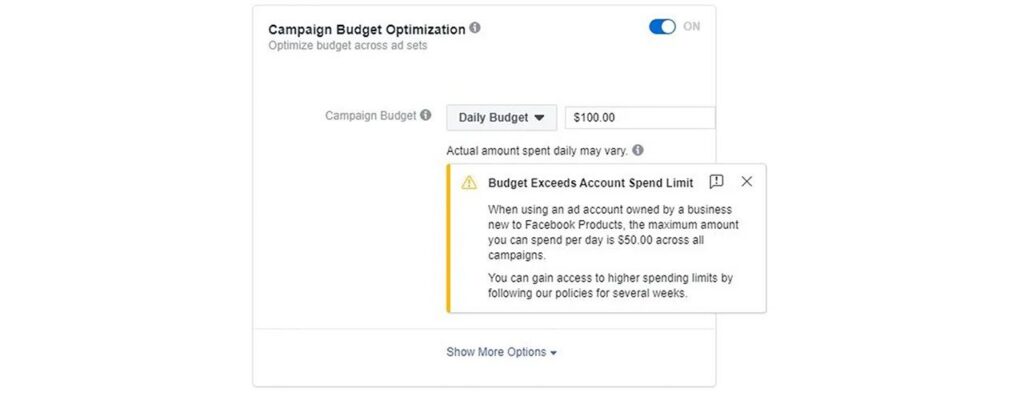
New ad accounts face invisible daily spend limits starting at $25–$50. Meta imposes these restrictions on accounts younger than 90 days or those with recent policy flags. These limits override your stated budgets, capping delivery regardless of how much you’re willing to spend. Warm up accounts by running $5/day awareness campaigns for two weeks before launching high-budget conversion pushes.
The learning phase requires 50 optimization events within a seven-day window. SMEs optimizing for “Purchase” events with $30 products need 50 sales—an impossible hurdle early on. Switch to “Add to Cart” or “Initiate Checkout” as your optimization goal. These events occur 3x more frequently, helping you exit learning faster. Once you achieve 100+ purchases weekly, revert to purchase optimization.
Campaign Budget Optimization (CBO) misallocation starves smaller ad sets. Meta’s algorithm funnels 80% of budget to the top-performing set, leaving others with insufficient spend to generate data. For product launches with multiple SKUs, disable CBO and set individual ad set budgets. This ensures each product receives enough impressions to determine true performance potential.
Proactive Monitoring: Building a Delivery Dashboard
Create a custom Ads Manager column set called “Delivery Health.” Include columns for: Delivery Status, Quality Ranking, Engagement Rate Ranking, Conversion Rate Ranking, Audience Size, Auction Overlap %, and Learning Phase Status. Review this dashboard every morning at 8 AM. A yellow warning in any column demands immediate action before delivery freezes entirely.
Set up automated rules to pause ads with Quality Ranking in the bottom 10% after 5,000 impressions. This prevents low-quality signals from poisoning your account’s reputation score. Simultaneously, create rules to increase budgets by 15% on ads with top-quartile engagement rates. Automation acts as your 24/7 media buyer, protecting and scaling while you handle operations.
Export Facebook Attribution data to Google Sheets weekly. Build a simple formula that flags campaigns delivering <70% of projected impressions based on budget and audience size. This early-warning system spots delivery issues 48 hours before Meta’s interface shows problems. SMEs using this method recover campaigns 3x faster than those relying on manual dashboard checks.
Related Resources
- Facebook Ads Not Delivering? 9 SME Fixes That Restore Revenue — Your delivery issues have specific solutions. Find yours in this guide.
- Meta Ads Manager: The Playbook for Global SMEs — Master Meta Ads Manager from setup to scaling with this complete playbook.
- ROAS Formula Explained: How SMEs Can Turn $1 Into $5 — Stop wasting ad spend. Calculate and optimize your ROAS with this step-by-step guide.
- Dynamic Creative Optimization: The SME’s Guide to Smarter Ads — Stop guessing what creative works. Let AI find your winning combinations automatically.
- Target Audience: The 5-Step Playbook for SMEs — Reach the right people every time with this step-by-step audience targeting guide.
FAQ: Rapid-Fire Answers for Time-Pressed Owners
Wait 24 hours for new campaigns, but only 6 hours for ads that were previously delivering. Check the Delivery column first—”Update Required” means immediate action needed, while “In Review” requires patience. If status shows “Active” but impressions remain at zero after 30 minutes, your bid is likely too low.
Not necessarily. Instagram has stricter visual guidelines. Your Facebook ad might run perfectly while Instagram placement gets blocked for text overlay violations. Always segment reporting by placement. If Instagram alone is paused, resize creative to 1080×1080 and reduce text to under 20% of image area.
Yes, but major edits reset the learning phase. Minor text tweaks under 20% of copy don’t trigger re-review. However, changing images, audiences, or optimization goals forces a full 24-hour review cycle. Clone the ad set instead, make changes to the copy, and launch fresh while the original remains paused. This A/B tests fixes without losing historical data.
Allocate 10x your average cost-per-goal as a daily minimum. If your average purchase costs $25, set $250 daily budgets. For awareness campaigns, 5x works. Never drop below $20 daily for any objective—Meta’s algorithm simply won’t gather enough data to optimize, creating a permanent underdelivery loop.
Export audience IDs for all active ad sets into Facebook’s Audience Overlap tool. Overlap above 30% means you’re self-competing. Merge those ad sets immediately and consolidate budgets. You’ll see 40% impression lifts within 48 hours of eliminating overlap.
Ready to turn your target audience into actual sales? Skip the spreadsheets and launch winning Meta ads in 1 min—paste your URL, pick a campaign, and let Didoo AI Agent do the rest. Start your free 7-day trial today and watch tomorrow’s revenue advertise itself.