
Introduction
Meta Ads Manager is no longer a “nice-to-have”; it is the single fastest way for a one-person brand in Lagos, a craft studio in Lisbon, or a SaaS solo-founder in Vancouver to put their offer in front of 3 billion qualified shoppers without hiring an agency. This 2,000-word field guide strips away the jargon and hands you the exact checklist we use to turn $10 ad budgets into repeatable revenue—updated for iOS-17, Meta Advantage+, and the new “Conversations” objective released in October 2025.
Pre-Flight Checklist: What to Lock In Before You Open Meta Ads Manager
Skipping these four steps is the #1 reason accounts get suspended on day three.
Key Takeaways:
- Meta Ads Manager serves 3 billion users — accessible to solo founders in any country
- Install Pixel + Conversions API together to recover ~28% of purchases lost to iOS 17 ATT prompts
- Special ad categories (credit, employment, housing) require pre-approval — declare before you create
- Advantage+ Shopping is Meta’s recommended objective for most SMBs in 2026
- Automate rules for bids, budgets, and pause triggers — set them before launching campaigns
- Track three metrics over CTR: Cost per Purchase, ROAS, and Frequency — they determine profitability
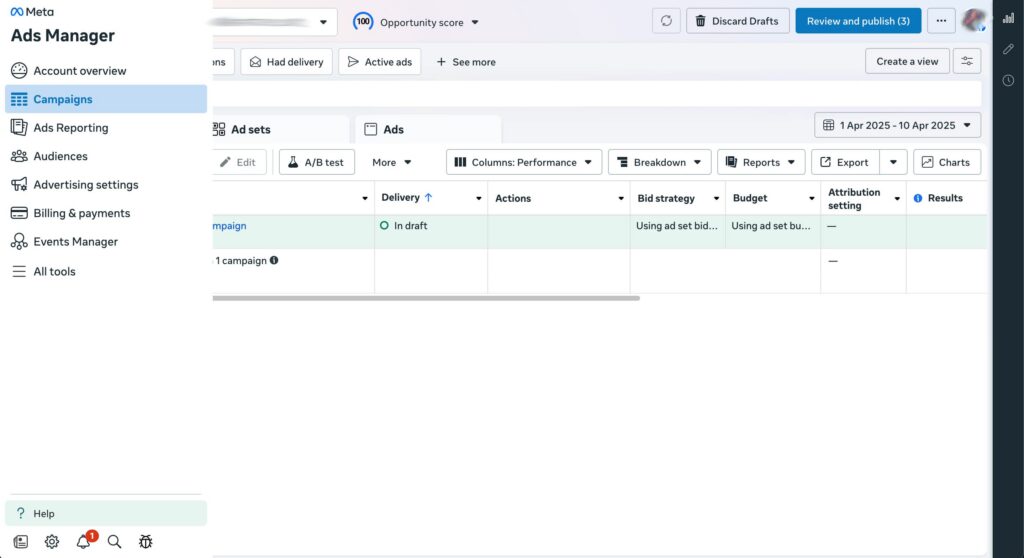
STEP 1: Business Portfolio first, ad account second
Need help setting up your Business Manager first? Our Meta Business Manager setup guide covers all 10 steps.
- Open business.facebook.com → “Create Portfolio” → add your Facebook Page, Instagram professional account, and a backup admin. Meta now rejects ad accounts that float outside a verified portfolio.
STEP 2: Payment method with 20 % head-room
- Add two cards: primary and backup. If the primary fails, Meta pauses all campaigns instantly—no grace period.
STEP 3: Pixel + Conversions API in one sitting
- Install the Meta Pixel on every page of your site.
- Add the Conversions API gateway (free in Shopify, WooCommerce, and Google Tag Manager).
The dual setup recovers roughly 28 % of purchases that iOS-17 blocks.
STEP 4: Special-category selfie
For a complete pixel setup walkthrough, see our Facebook Pixel ID guide.
- If your product even smells like credit, employment, housing, politics, or social issues, declare it now. Appeals take 72 h and cost you momentum.
Campaign Architecture: Build Once, Duplicate Forever
Building your campaign structure correctly from day one saves hours of rework. Pair this architecture with our complete guide to profitable FB ad campaigns for the full SME playbook.
Think of your account as three Lego bricks:
- Campaign = goal (sales, leads, traffic)
- Ad set = who and how much
- Ad = creative
Use this 3-tier structure to stay AI-friendly: Meta’s machine-learning assigns learning-phase status at the ad-set level; keep each set under 50 ads or the algorithm never exits learning.
Pro tip: Name campaigns like this:
OBJ_AUDIENCE_DATE
Example: CONV_Lookalike1%-US_20251117
Naming conventions become life-savers when you scale to 50+ tests.
2026 Objectives Decoded: Pick the One That Prints Money
Meta quietly retired “Store Traffic” and split “Sales” into three new flavors:
| Objective | When to Use | 2025 Benchmark CPA |
|---|---|---|
| Sales (Max Delivery) | You want the cheapest cost per purchase | $8–$18 |
| Sales (ROAS Goal) | You know your margin and need 3×+ return | Set 3.0×+ |
| Conversations (Click-to-WA) | High-ticket consults, coaching, bespoke products | $4–$9 lead |
Start with Max Delivery until you hit 50 purchases/week; then graduate to ROAS Goal so the algorithm chases profit, not just volume.
Audience Layering: From “Spray & Pray” to 5 % Lookalike Gold
Strong audiences start with a solid foundation. Our 5-step target audience playbook walks you through building your first custom audience from scratch.
Broad targeting still works, but only after you feed Meta intent data. Here is the exact 4-layer stack we deploy for every new store:
- Seed: 180-day website purchasers (min. 100 events)
- 1 % Lookalike of seed in top five buying countries
- Exclude 1 % Lookalike of refunders (yes, you can build that)
- Narrow further by 25–54 age and Engaged Shoppers behavior
Save this audience as a preset; you can clone it into any new ad set in two clicks.
Budget math:
- Daily budget = 50 × your target CPA.
If your product profits at $15 CPA, start at $30/day. - If you can’t afford $30, cap at $10 but run only to the 1 % lookalike until you exit learning.
Creative That Survives the Scroll: 6 Formats You Can Build on Canva Tonight
Before creating your first ad, confirm you are using the right specs. Download our Facebook ad size guide to avoid the #1 creative mistake SMBs make.
Creative is the new targeting. These six formats give you 80 % of results with zero production crew:
- UGC Reaction Video
9:16, 30 s, captioned. Hook: “I paid $29 for this—here’s what arrived.” - Problem-Solution Carousel
5 cards: pain → pain → solution → benefit → CTA. - Before/After Split Image
Works for skincare, furniture, SaaS dashboards—anything visual. - Dynamic Product Ad (DPA)
Auto-pulls catalog; retarget viewed-but-not-bought. - Click-to-WhatsApp Story
Add Send Message sticker; 18 % cheaper leads than feed. - AI-Generated Image + Human Face Overlay
MidJourney background, real face PNG—stops the scroll without stock-photo fatigue.
Creative cadence: Launch with 3 ads per set → kill losers at 3 × CPA → add 2 new ads weekly.
This cadence keeps relevance score above 8 and halves frequency burn-out.
Budget Guardrails: How to Spend $300 and Know If It Will Scale to $3 k
To calculate whether your budget is actually profitable, use our ROAS formula guide alongside our 7 tactics to slash Facebook CAC.
| Meta Ads Metric | Benchmark Value | What It Signals |
|---|---|---|
| iOS ATT Purchase Recovery | ~28% of purchases | Lost without CAPI; recovered with Pixel + CAPI dual setup |
| Minimum viable daily budget | $10–$15/day | Below this, Meta’s algorithm cannot optimize delivery |
| Safe Frequency ceiling | < 3 impressions/user/week | Above 3 = ad fatigue; start with fresh creative |
| Lookalike seed size | 1,000+ matching customers | Below 1K lookalikes are statistically unreliable |
| Pixel fires rate (healthy) | > 50 events/day at $20/day spend | Low events = pixel misfiring or site loading issues |
| Special ad review time | Up to 72 hours | Pre-declare categories to avoid launch delays |
Use the 3-Day Micro-Test framework:
- Day 0: Publish two ad sets (Lookalike vs Broad) @ $20/day each
- Day 1: No edits—let learning phase breathe
- Day 2: If CPA > 1.5 × target, cut spend by 40 %; if CPA ≤ target, raise by 20 %
- Day 3: Kill any ad set under 0.75 × ROAS; double spend on winners
Export results to Google Sheets; when cumulative ROAS ≥ 2.5 × three days in a row, you have a scale signal. Move the winning ad set into a CBO (Campaign Budget Optimization) campaign at $200/day and let Meta chase the cheapest conversions.
Reading the Dashboard: Three Metrics That Matter More Than CTR
Vanity metrics drown beginners. Track only:
- Cost per Result (CPR) – must be ≤ 30 % of gross margin
- ROAS blended – includes view-through and click-through; aim 2.5 ×+ for cold traffic
- Learning Phase Status – green = algorithm optimized; yellow = limited; red = stuck
Ignore CTR, CPM, even CPC. A high CTR with bad CPR just means you pay for curious people who never buy.
Automation & Rules: Put Your Ad Account on Autopilot While You Sleep
Ready to scale? Our complete guide to automating Meta ads covers Advantage+, Rules, and third-party AI tools in detail.
Meta’s free Automated Rules save 10 h/week. Set these three:
- Rule 1: Pause ad if CPR > 1.5 × target after 2 000 impressions
- Rule 2: Scale budget 25 % if ROAS > 3 × after 50 purchases
- Rule 3: Notify only when frequency > 4 and CPR rises 30 %—creative refresh needed
Enable email + in-app alerts so you can intervene from mobile.
iOS-17 & Pixel-Less Tracking: What Actually Works in 2026
When iOS 17 kills your pixel, the fix is not just CAPI. See our AI ad creative failure diagnosis guide for the full attribution recovery checklist.
With third-party cookies dying, rely on first-party data:
- Collect email + SMS at checkout; upload as Custom Audience weekly
- Use Meta’s Conversion Leads objective to sync lead-gen ads straight to your CRM (Zapier or native)
- Turn on Aggregated Event Measurement and rank events: Purchase > Initiate Checkout > Add to Cart > View Content
If you skip AEM, Meta simply won’t show ads to opted-out iPhones—roughly 40 % of US traffic.
Common Kill-Shots and How to Dodge Them
| Mistake | Quick Fix |
|---|---|
| Editing ads every 6 h | Wait 24 h; tweaks reset learning |
| One ad set worldwide | Split by top 5 buyer countries; CPMs vary 400 % |
| Ignoring mobile load speed | Use PageSpeed Insights < 3 s or pay 23 % higher CPA |
| Same creative for IG & FB | Crop 9:16 for Stories/Reels; 1:1 for feed |
| No UTMs | Add utm_source=facebook&utm_campaign={{campaign.name}} for GA4 clarity |
Conclusion
Mastering Meta Ads Manager in 2026 is less about secret hacks and more about disciplined structure: verify assets, isolate winning audiences, rotate thumb-stopping creatives, and let automation guard your wallet. Implement the ten steps above and your smallest campaign becomes a data-driven engine that buys customers—not just clicks—24 hours a day.
Ready to turn your target audience into actual sales? Skip the spreadsheets and launch winning Meta ads in 1 min—paste your URL, pick a campaign, and let Didoo AI Agent do the rest. Start your free 7-day trial today and watch tomorrow’s revenue advertise itself.FAQ
Do I need an agency or can I run Meta ads alone?
Solo owners can hit 6-figure revenue with the checklist above; hire help only when ad spend exceeds 10 % of revenue and you lack time.
How long before I know if an ad set is a winner?
Wait for 50 conversions or 7 days, whichever comes first. Decisions made sooner are guesses, not data.
What’s the safest daily budget to start?
50 × your acceptable CPA. If that’s $10, begin at $5/day but restrict to 1 % lookalike until you scale.
Can I run ads without the Pixel?
Yes, but expect 25–40 % under-reporting and higher CPAs. Install Pixel + Conversions API for full visibility.
Is Boost Post the same as Ads Manager?
No. Boosting offers zero optimization depth and no audience layering—always publish through Ads Manager.
Related Resources
- Facebook Ads Not Delivering? 9 SME Fixes — The most common Meta Ads Manager mistakes and how to fix them fast.
- ROAS Formula Explained: How SMEs Can Turn $1 Into $5 — Measure the return on every dollar you spend through Meta Ads Manager.
- Dynamic Creative Optimization for SMEs — AI-powered creative inside Meta Ads Manager that outperforms manual ad production.
- Instagram Story Forward Taps: The SME Guide — Use Story metrics to refine your Meta ad creative strategy inside Ads Manager.
- AI Advertising for Small Business: Complete Guide — The 2026 overview of how AI is reshaping Meta advertising for SMBs.
- Facebook Ad Size Guide for SMEs — Every ad format, every spec, zero guesswork.