
This Didoo product operation guide walks you through the 4 core steps to launch and manage your Meta ad campaigns with our AI Media Buyer, plus answers 7 of the most common questions new users ask. Didoo AI is an AI media buyer platform for SMBs that automates Meta ad campaigns through a chat-based AI agent — no agency, no learning curve.
Quick Reference — 4 Steps + 7 FAQs
FAQs cover: ad material generation, publishing flow, data tracking, reliability, security, Meta auth scope, and multi-campaign management.
STEP 1. Onboarding Modal Setup
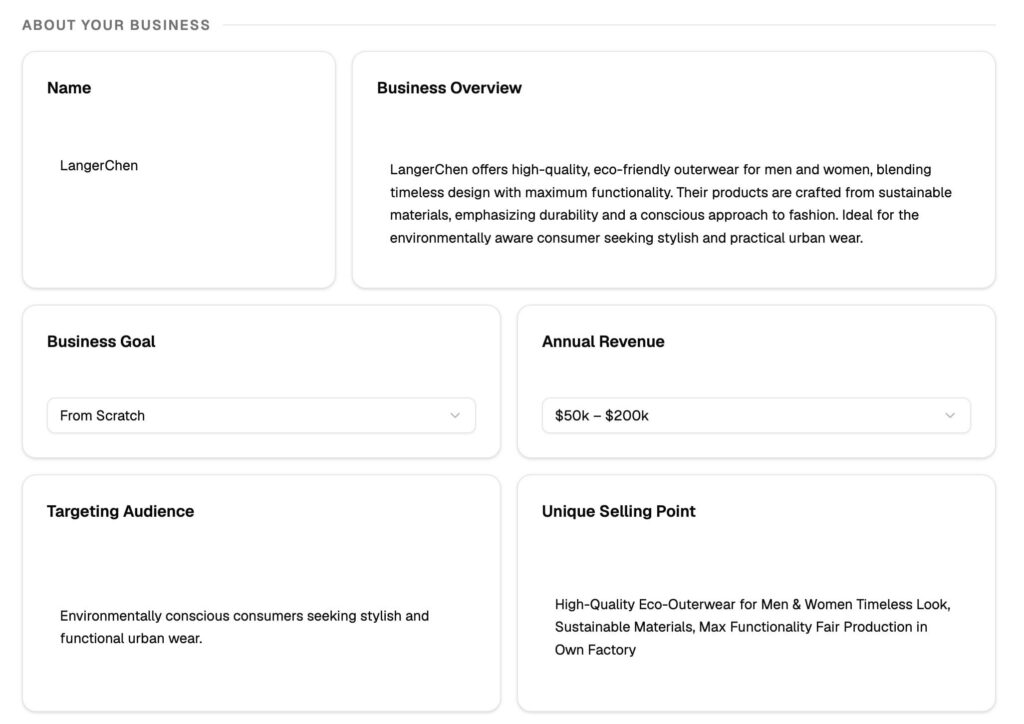
After completing account registration, you will enter a streamlined onboarding process. The first step to launch high-quality ad campaigns is to confirm and submit your enterprise’s current scale and business stage, which helps tailor subsequent ad solutions for your business needs.
All your information and data on Didoo is securely stored in your exclusive cloud-based virtual machine with full data confidentiality, and no data leakage will occur.
STEP 2. Create a Project
A Project serves as the fundamental foundation of all Didoo functions. All core operations including AI Media Buyer activation, ad publication, creative material generation, data analysis, and routine task management must be performed under a created Project.
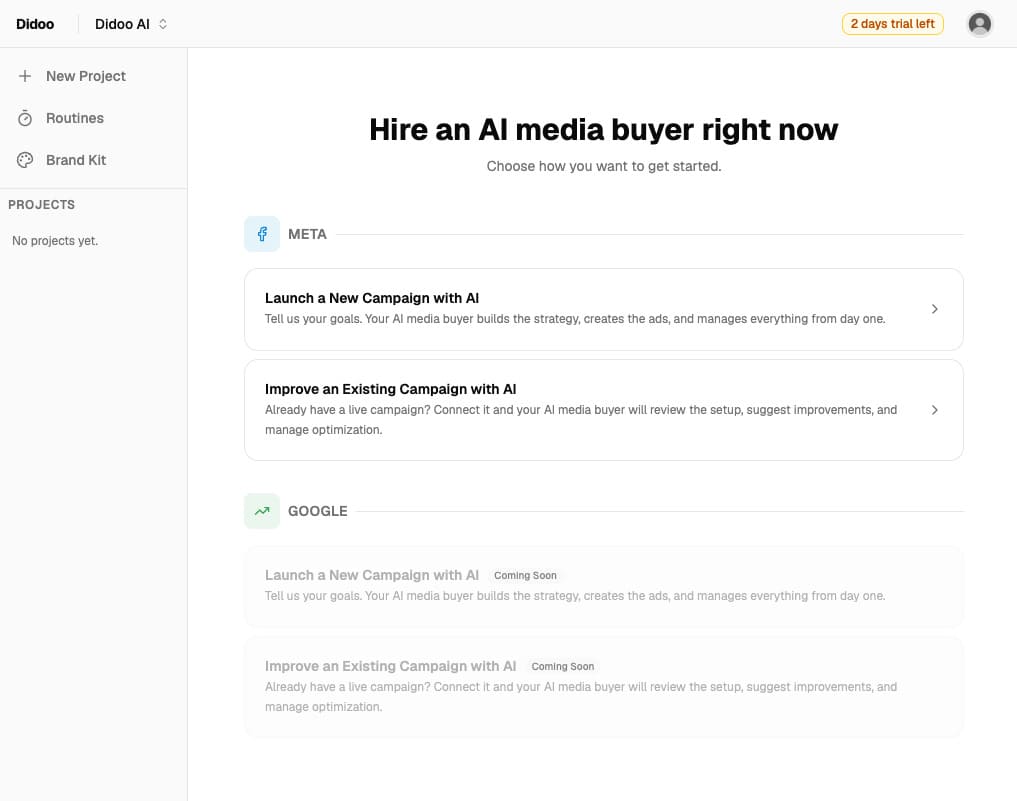
Meta account authorization is mandatory at this stage. Didoo requires your authorization to access and configure your Meta Ads Manager data to support normal platform operations. You can freely select the scope of authorization, and unapproved data will never be accessed or acquired by the platform. To update your authorization scope later, navigate to the Settings page via the bottom section of the left sidebar in the Didoo dashboard.
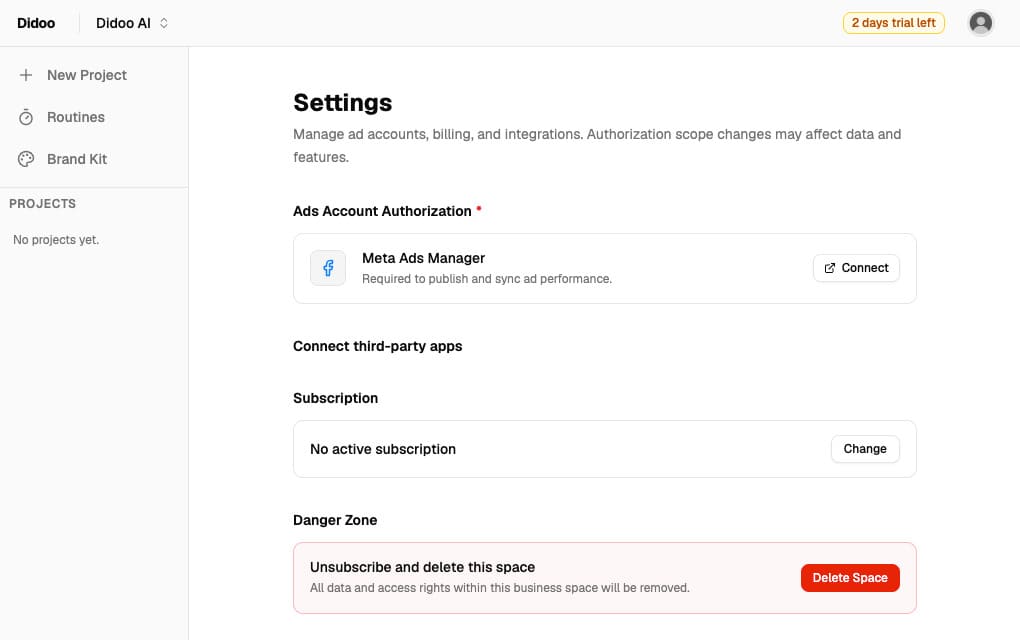
Two project creation modes are available to adapt to different scenarios: If you have ongoing Meta ad campaigns, select the Hand Over mode to optimize and improve your existing ad delivery performance. If you need to launch brand-new ad campaigns via Didoo, choose the Launch New Project mode.
| Mode | Best for | What you get |
|---|---|---|
| Hand Over Project | Existing campaigns needing optimization; account data handover | AI reviews historical data and optimizes active campaigns |
| Launch New Project | Brand-new campaigns from scratch | AI generates fresh strategy, creatives, and publishes your first campaign |
Each Project corresponds to one exclusive AI Media Buyer and only supports a single ad campaign. To manage multiple independent campaigns simultaneously, you need to create multiple separate Projects.
We recommend completing the onboarding setup carefully — a clear project brief gives your AI Media Buyer the best understanding of your business goals.
STEP 3. Interact with Your Exclusive AI Media Buyer
It may take a short while for your AI Media Buyer to get ready. The system needs sufficient time to analyze the enterprise information you submitted during onboarding, parse your filled website URL, and synchronize your existing ad campaign data (if applicable). These preprocessing steps enable the AI to fully understand your business model and deliver customized, high-precision ad strategies and creative solutions.
The AI Media Buyer is fully activated and ready for use once it sends you a greeting message. You can engage in free interactive conversations with it, propose any personalized ad demands and business ideas, or inquire about its functional capabilities to get familiar with the tool.
The AI Media Buyer supports full end-to-end ad operation capabilities. It can assist you in discussing business development directions, formulating professional ad strategies, generating complete ad configuration schemes, and producing ad image materials (the Reels generation function is currently under development and will be launched soon — see our Didoo blog for the latest product updates). After configuration, you can directly publish ads to Meta Ads Manager via the platform.
Post ad publication, the AI provides real-time ad data analysis, regular monitoring, and abnormal alert services. For lead generation ad campaigns, it can create and publish Meta native forms to collect leads from your Meta business page. Additionally, it supports comprehensive account and campaign diagnosis, verifying the rationality of ad configurations and the normal operation of pixels and custom events.
The AI Media Buyer will never perform any operations on your Meta Ads account without your manual confirmation. All operation logs can be viewed in the right sidebar tab for full traceability. After authorizing the AI to publish or adjust ad configurations for the first time, we recommend you double-check all settings in the Meta Ads Manager backend to ensure full compliance with your requirements.
STEP 4. Common Functional Modules
The right sidebar integrates all frequently used core functions, including data charts, image material library, operation logs, and routine task records, to facilitate daily operation and management. We built these modules based on feedback from hundreds of SMB advertisers who needed one-click access to their most-used functions. Learn more about Didoo product updates on our blog.
1. Chart Module
The data chart will automatically update and display comprehensive ad performance data within several hours after your ads go live, presenting intuitive campaign operation trends.
2. Images Tab
This module stores all image materials corresponding to the current campaign and displays the detailed delivery performance of each material, helping you screen high-quality materials for reuse or secondary optimization. All images generated by the AI will be automatically synchronized here.
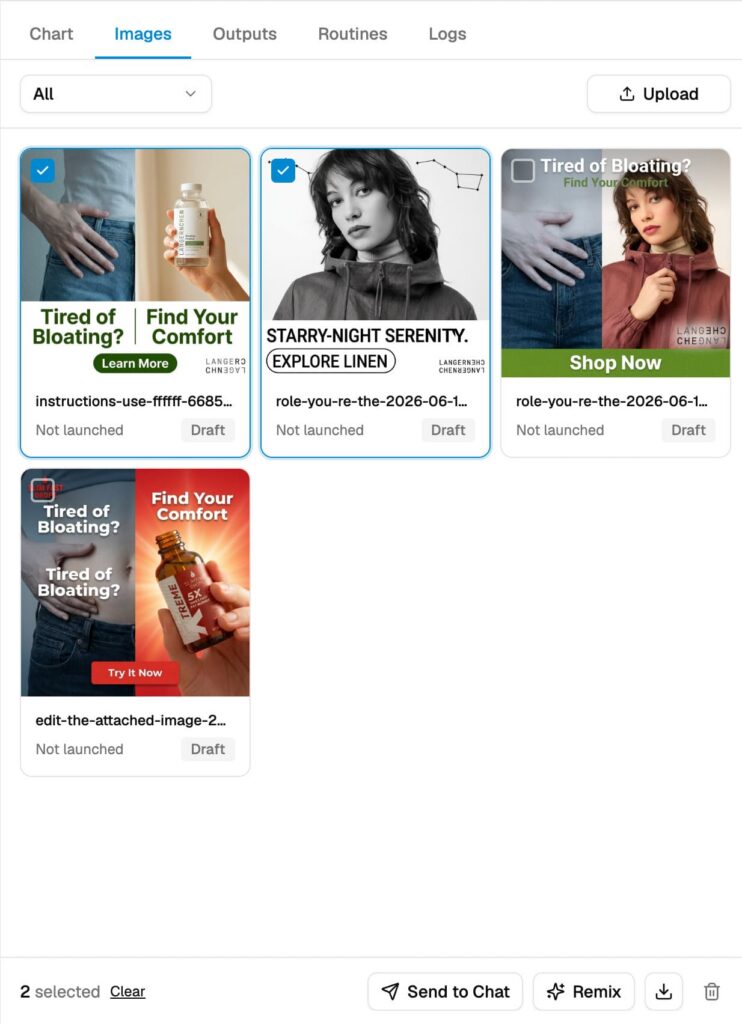
You can select a single image and click Send to Chat to instruct the AI Media Buyer to perform targeted processing on the material. For batch optimization of high-performing materials, select multiple images and click the Remix button. The AI will generate a new batch of innovative materials while retaining the core winning attributes of the original images.
3. Routines Module
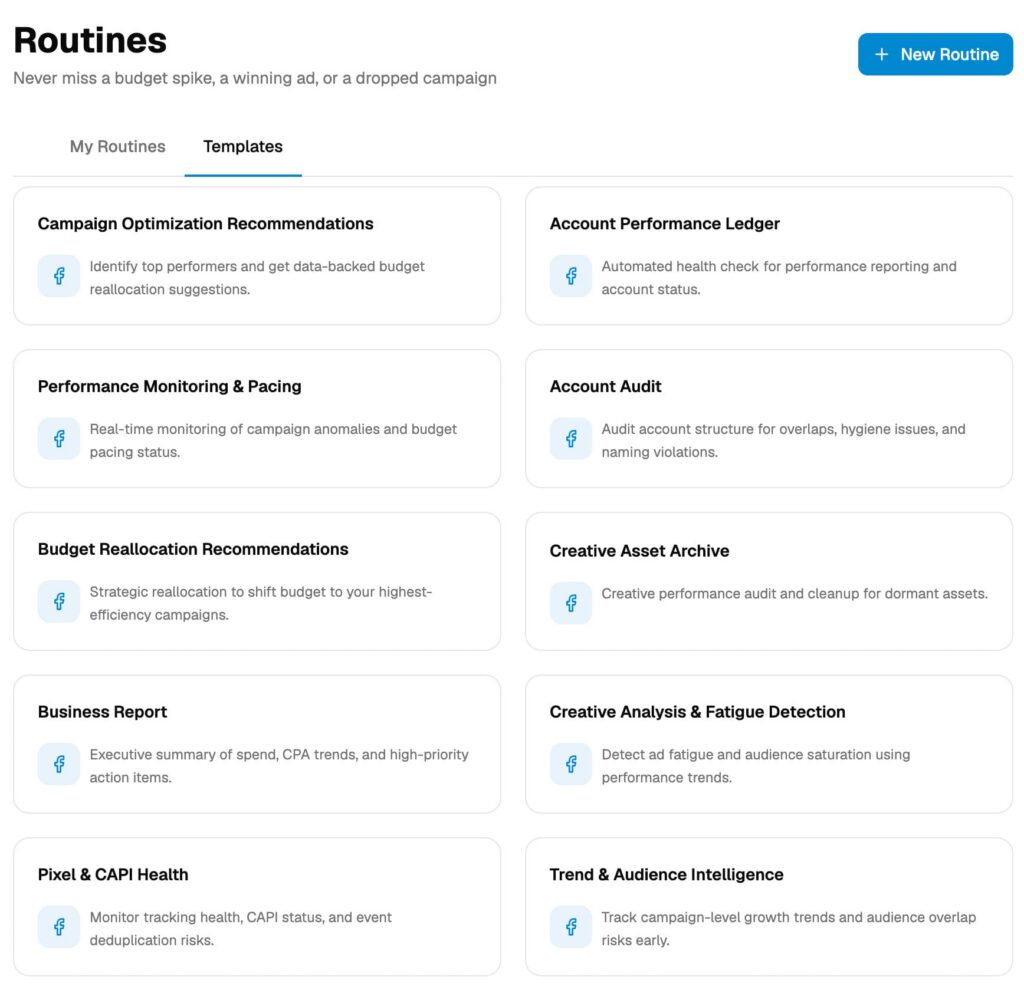
You can customize daily, weekly, or monthly fixed routine tasks, allowing the AI Media Buyer to automatically execute specified operations on a regular basis. The AI will send a task completion report in the chat dialog after finishing each routine, and you can check the operation results at your convenience.
FAQs
You can generate ad image materials by interacting with your exclusive AI Media Buyer through chat commands. All AI-generated and manually uploaded materials for the current campaign are centrally stored in the Images Tab on the right sidebar. The platform automatically displays the real-time delivery performance of each material, helping you screen high-quality resources. For single material optimization, select an image and click Send to Chat to assign customized editing tasks to the AI. For batch material renewal, select multiple high-performing images and use the Remix function; the AI will generate new creative materials while retaining the core winning attributes of the original images to ensure ad effectiveness. For background on how the AI generates creatives, see our blog.
First, create a complete Project and finish valid Meta account authorization, which enables the platform to connect with your Meta Ads Manager. After the AI Media Buyer finishes preprocessing and initialization, you can communicate your ad demands (including ad strategies, positioning, and creative requirements) to the AI. The AI will formulate complete ad configurations and generate matching ad materials based on your business needs. Once you confirm the overall ad scheme, you can authorize the AI to directly publish the ads to Meta Ads Manager. For lead generation ads, the AI can also generate and publish official Meta native forms to collect page leads. It is recommended to double-check all ad settings in the Meta backend after the first publication to meet your exact requirements.
Didoo provides multi-dimensional data monitoring and viewing functions. After your ads go live, the Chart Module on the right sidebar will automatically update and display intuitive ad performance data and campaign trend data within several hours. You can check the delivery effect of each material in the Images Tab to evaluate creative quality. For regular automated tasks set via Routines, the AI will feed back detailed task completion results in the chat dialog after execution. In addition, you can view all AI operation records and ad adjustment logs through the platform’s operation log tab for full-process data and operation traceability.
All your data and business information on Didoo are fully protected. The platform stores all user data in an exclusive independent cloud virtual machine for each account, with isolated data storage and strict encryption protection. Your enterprise information, ad data, Meta account authorization information and other private content will not be leaked, shared or accessed by any unauthorized parties. In addition, you can independently control the scope of Meta account authorization on the Settings page, and the platform can only obtain and process data within the authorization range you confirm, ensuring full control of your data security. For a deeper overview of our security architecture, see Didoo security (placeholder — replace with actual security page if available).
You can update your Meta account authorization scope at any time. Simply navigate to the Settings Page via the bottom entry of the left sidebar in the Didoo dashboard, modify the authorization permissions according to your actual needs, and save the changes. The platform will only synchronize and process Meta data within your latest authorized scope, and unapproved data will not be acquired or used by the system. We designed the authorization model this way so you always stay in control of what the platform can access.
Each Didoo Project corresponds to only one independent campaign and matches one exclusive AI Media Buyer. To manage multiple Meta ad campaigns at the same time, you need to create multiple independent Projects separately. Each Project can independently complete campaign operation, material generation, data analysis and routine management, realizing isolated and refined management of multiple campaigns. To compare what you get per Project, see Didoo pricing (placeholder — replace with actual pricing page if available).
Need Help?
Still stuck? Read more on the Didoo blog, or revisit the Didoo homepage for an overview of all platform capabilities.